
What to do with your old blog posts: AI and Search Console
 Studio15 min read

TL;DR Learn how to clean up your blog by cross-referencing Search Console metrics with artificial intelligence. A practical guide to deciding which articles to update, merge, remove, or keep safely, avoiding mistakes and protecting your traffic.
1. The cluttered digital storage room
You open your blog and find a hundred posts. One explains a tool that no longer exists. Another announces a promotion that ended three years ago. Four cover almost the same ground, and there's a guide from 2019 you're embarrassed to open because the screenshots belong to another era. You sit down to sort things out. You read five titles, hesitate over all five and end up doing what you always do: closing the list and writing a new post. The pile keeps growing.The hard part is deciding what stays. You remember the effort each post took, but not how much it does for you today. Sometimes you keep one out of attachment while you're about to scrap another that still brings in customers.
Publishing for the sake of it comes at a cost. You have more posts to maintain and outdated explanations to fix. On top of that, readers have to choose between three almost identical guides to answer one question. Deleting everything published before 2023 won't fix your blog either. Google makes clear that removing old content to make a site seem fresh doesn't, by itself, improve its ranking. A date doesn't tell you whether a post is useful. [1] Let's sort it out. Export your Search Console metrics and ask AI to process them. Then check the results before touching your website. The table in section 3 will help you decide what to do with each post.
2. The trap of using AI blindly
The shortcut is right there. Copy the titles, paste them into a chat and ask: “Which ones should I delete?”
The chatbot responds straight away with a table: delete this one, merge those, keep the other. It gives a convincing reason for every decision. It looks like the job has been taken off your hands.
But the chatbot has only read the titles. You haven't given it the search queries or the leads who went on to buy. Nor the links from other websites. Yet it still tells you what to remove.
The answer sounds confident. So confident that you might hit “delete” without checking it.
If you give it titles and ask for business decisions, you're letting it fill in the blanks.
Keep the task focused: sort the metrics and find shared search queries. Ask it to point out differences between posts. Then check the numbers; tables can contain mistakes too.
3. The four-bucket decision table
Review the metrics and put each post in one of these four buckets. Still have metrics or leads to check? Leave the post pending. You don't have to decide everything this afternoon.
Bucket | What makes it worth a look | What to check before acting |
|---|---|---|
Update | Lots of impressions but few clicks, declining performance or outdated information | Read the queries, check the position and see whether the title and text answer those queries |
Merge | Redundant pages appearing for shared search terms | Whether they meet the same need and make sense together |
Delete / redirect | No recorded impressions in twelve months and no purpose that justifies keeping it | Check whether it brings in sales, gets links or visits from other channels, and has a useful replacement |
Leave alone | It still helps and brings in traffic, leads or sales | Whether the information is still valid |
Update: find out why people see it but don't click
A low CTR helps you spot a page in the table, but it doesn't tell you what's wrong. Step B breaks down the calculation using the original rows. If the post appears far down the results, changing two words in the title may not solve the problem. If it ranks well, compare what people are searching for with what the title promises. Open the post's queries. You can filter them by country or device to investigate differences between those groups. [2] Read the searches and check whether the text answers them before tweaking the headline. Check the steps, screenshots and products mentioned too. Fix anything outdated and keep what still helps. Changing the date without improving the content solves nothing.
Merge: bring together posts that do the same job
You have three posts that answer the same question and barely differ. When a step in the process changes, you have to fix all three. One falls behind, another contradicts the first, and readers don't know which to trust.
For example, you have two guides to exporting from Search Console. They explain the same steps, but one adds new screenshots. You can bring those steps and screenshots together in a single guide. Mark the paragraphs and screenshots you want to keep from each original.
Choose where you'll publish the complete post and finish it before removing the originals. The final section explains how to check whether it answers the same questions and whether any explanation has been lost in the merge.
Delete or redirect: a zero doesn't decide for you
Has a post gone twelve months without impressions? Check the selected date range and property. Review the filters and the file's contents. Then find out whether it gets visits from other channels or serves a purpose outside search. To go in this bucket, it must meet both conditions: no recorded activity and no remaining use. For example, an announcement for an expired promotion that you no longer need to keep. Follow step C before removing it. Also look for equivalent content that could replace it. Section 5 explains what to do with or without a replacement.
Leave alone: that's a decision too
A guide from 2019 can still help and attract interested readers. Leave it alone. Spend that time on outdated content.
Fix broken links and any outdated facts. Don't rewrite the whole thing out of boredom or because AI suggests a catchy title. Reviewing your blog isn't about finding an excuse to change everything.
4. The practical workflow: Search Console data + AI
Step A. Export the last twelve months
Open Search Console and select your website's property. Open Performance in search results.
Set the date range to the last twelve months.
Check the search type and remove any filters that don't belong in this review.
Turn on clicks, impressions, CTR and average position.
Open the Pages tab.
Click Export and download the CSV.
Record the dates and filters alongside the file. Six months from now, you could open it and mistake visits from Spain for visits from all countries. This report gives you clicks from Google; to find out what happened afterwards, you'll need to check your analytics or the enquiries you received. [2]
To compare posts, keep each one linked to its search queries. Click its address in the Pages tab to filter the report. Open Queries and export the table. Repeat the process for the other candidates and label each file. [3] Two separate lists, one of addresses and another of searches, won't let you reconstruct that link.
You can export up to 1,000 rows per report. Search Console also hides some queries for privacy. A missing row doesn't prove zero performance. [4][5]
Prepare these files; each covers part of the review:
File | Contents | What it's for |
|---|---|---|
Performance by page | ID, clicks, impressions, CTR and position | Sorting and spotting differences |
Queries by page | ID, query and metrics | Finding shared terms |
Conversions | ID, date range and recorded conversions | Checking whether it generates leads or sales |
Conversions come from your analytics or CRM. If you haven't measured them, write “no data”. Don't put zero just because the cell is empty.
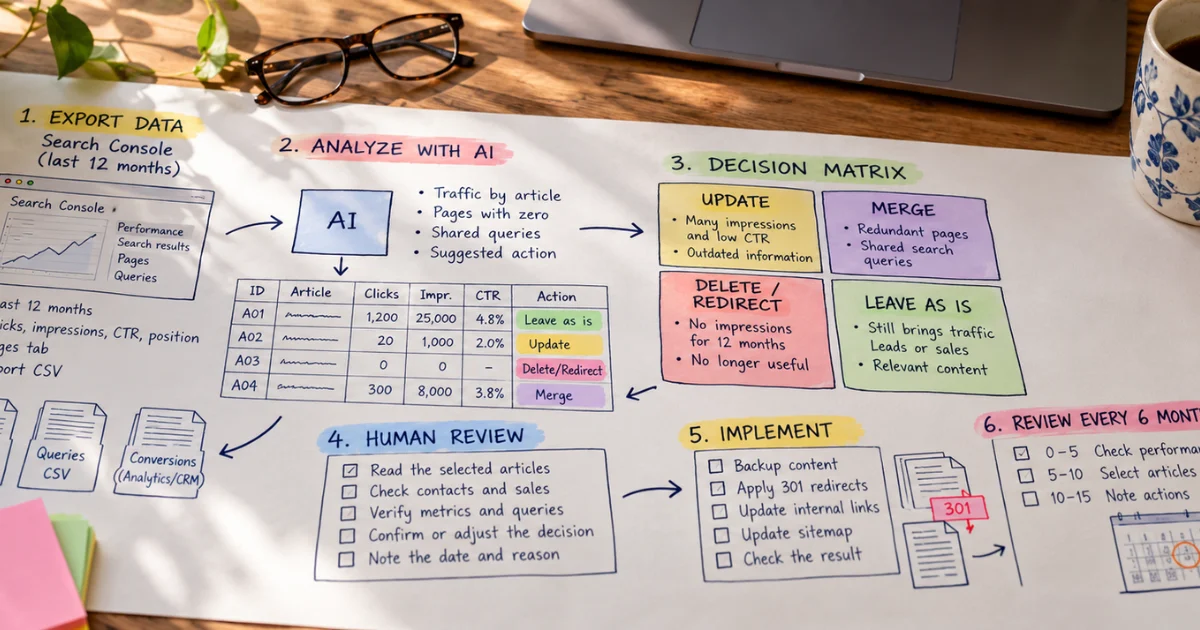
Step B. Ask AI for an initial proposal
Give each post an ID: A01, A02, A03. Use it in every file and keep its original address separately. Ask the chatbot to work with those labels so you can find the content without relying on generated links.
Attach the files and copy this prompt:
I'm going to give you some data exported from Search Console for my blog. I want to clean things up and decide what to do with my old posts.
Analyse the data and do the following:
Tell me which posts still bring in traffic and which have been at zero for months.
Point out which posts are stepping on each other's toes because people use the same words to search for them.
Suggest, in a table, which bucket each post belongs in based on its performance: Update, Merge, Delete/Redirect or Leave alone.
Strict rule: Strip your response of all the usual rubbish. I don't want long introductions, stock phrases, apologies or generic conclusions. Get straight to the point and give me only the results in clear tables I can act on.
Compare the tables you get back with the original CSV. Check the IDs, queries and figures. Fix any changed labels or added searches before moving on. These two examples show you how to check the totals.
Two examples to check the tables you get back
We've made up the figures in the next two tables to show how the process works. They don't come from an audit or prove that a page needs changing.
Example 1. CTR for a group of pages. Both rows use the same date range, search type and filters, grouped by page:
Page | Clicks | Impressions | Row CTR |
|---|---|---|---|
A02 | 20 | 1,000 | 2% |
A07 | 30 | 9,000 | 0.333…% |
Group total | 50 | 10,000 | 0.5% |
The calculation is (20 + 30) / (1,000 + 9,000) × 100 = 0.5%. If you average the two pages' percentages, you get about 1.167%, which doesn't represent the group's click-through rate: you'd be giving 1,000 impressions the same weight as 9,000.
This total summarises those two rows. Search Console may group things differently when showing the whole property. That's why you shouldn't compare both percentages as though they measured the same thing. [2]
Example 2. What it means when two pages share queries. Every row uses the same date range and filters. To let you check the whole example, we've included every query in this small sample:
Query | Page | Clicks | Impressions |
|---|---|---|---|
export Search Console to CSV | A02 | 12 | 600 |
export Search Console to CSV | A07 | 9 | 900 |
download Search Console queries | A02 | 8 | 400 |
download Search Console queries | A07 | 6 | 600 |
Search Console export limit | A07 | 15 | 7,500 |
A02 appears for two queries in the sample and A07 for three. They share two of the three distinct queries: the first two. For those shared queries, A02 totals 20 clicks and 1,000 impressions; A07 totals 15 clicks and 1,500 impressions. You can check this by adding up the first four rows. The last query is associated only with A07 and stays outside that subtotal. If you group all the rows by page, you get the figures from the first example: A02 has 20 clicks and 1,000 impressions; A07 has 30 clicks and 9,000 impressions. That lets you follow the trail from individual queries to the combined result instead of trusting an isolated number.
These rows show shared searches. They don't tell you whether one post is taking traffic from the other. You still need to check how clicks change over time, compare positions and read both posts. That's why we write review A02 and A07”, not “delete A02.
Step C. The final human check
Review the buckets AI suggested and read the selected posts. Check the form submissions to see whether those leads went on to buy. Cross-check that record against the metrics before accepting or changing each proposal. If you don't have the record, leave that point pending. Record the date of the change and explain the reason plainly. For example: “Merge A02 with A07 because they explain the same export process; keep A07's screenshots.” Or: “Keep A12 because support sends it to customers.” These notes will let you compare the decision with the change you actually made.
5. Making the changes and keeping things tidy
How to set up 301 redirects
Save a copy of the posts before making the agreed changes.
Apply the decision from step C. In the example, A07 keeps the content from both posts. Set up a permanent redirect from A02 to A07 in your content management system or on your server. Open the old address and check where you land. Update internal links too, so they lead to A07 without going through A02. Google covers redirecting several pages to one that combines their content. It also warns against sending old pages to an irrelevant destination, such as the homepage. As a general rule, it recommends keeping redirects for at least a year. [6]
If you've removed a page and there's nothing equivalent, it can return a 404 or 410, the codes that indicate the content is no longer there. Sending visitors to the homepage by default doesn't answer the question that brought them to you.
Update the sitemap and check the result
Update the sitemap with the addresses you want to keep indexed. Submit it through Search Console when appropriate and check for errors. Submitting the sitemap helps the search engine discover your content, but doesn't guarantee it will index it straight away. [7] After the next crawl, check whether the destination appears as expected before making further changes.
The fifteen-minute review every six months
Once you've set up your record, set aside fifteen minutes every six months to open it and decide what needs reviewing.
Minutes | Task |
|---|---|
0–5 | Check performance changes and outstanding tasks |
5–10 | Choose the posts that need attention |
10–15 | Write down what you need to check or change |
Finish those fifteen minutes with a list of posts and an outstanding task for each. If one needs an afternoon's work, set that time aside. That way, you won't put off the clean-up until you've published another fifty posts.
Why AI can't make the final decision
AI can recommend the wrong change, and you can end up publishing it. Before you do, look for what's missing from the tables. These four cases explain what you could lose by skipping that step.
What AI can measure or compare using the material provided | What it doesn't know unless you provide and check it |
|---|---|
Similarities between titles and texts | Sales attribution and CRM data |
Word count and structure | How the post helps customers and support |
Impressions, clicks and queries | External backlink profile |
Matches between pages | Suitable redirect destinations |
1. It sees the clicks, but doesn't know who ends up buying
Here's a made-up example: a guide gets fifteen clicks a month from Google and helps land two contracts a year. Fifteen clicks a month might not sound like much. Speak to whoever closed those sales before deciding the guide's future.
Look for its connection to sales in the forms, CRM or emails you've received. You may not be able to reconstruct the customer's entire journey. Leave it pending; “we don't know” doesn't mean “it doesn't sell”.
2. It deletes the page and leaves the links stranded
You might dismiss a post after reading it and overlook its links from news outlets, universities or trade magazines. Deleting it leaves the people following those links with nowhere to go. Check those external references and look for a useful replacement before removing it. Imagine an association recommends your guide in its list of resources. Follow the link after the change. Does the reader find a useful explanation or end up with content unrelated to their question? That dependency doesn't show up when you compare titles. Google advises checking external links when preparing address changes. [6]
3. It rewrites everything and throws out the useful bits
When combining the originals, AI can delete an example or skip an exception. Readers follow the steps in the new text and get stuck right where they used to find help. In its guide updated on 1 October 2026, Google asks you to check and manually review AI-generated text before publishing it. It also warns that producing lots of pages without adding value can breach its scaled content abuse policy. [8]
Compare a specific step before and after. Imagine the original said: “Filter by page before exporting the queries”, and the merged version cuts it to “Export the queries”. Without the filter, readers download searches for the whole property and lose the link to the post they wanted to review. Send that draft back and restore the missing step. [3] Publishing like this across the blog multiplies the mistakes. Google can show your pages less often or exclude them from its results when they breach its policies. [9] Using AI doesn't, by itself, mean a penalty. Publishing at scale without adding value can break those rules.
4. It mistakes similar topics for the same intent
Two posts can cover the same tool and answer different questions. One helps people decide whether to buy it. The other explains how to fix a problem after installing it. AI may combine them after finding shared words. Then someone trying to fix a problem has to work through a product comparison first. Read the searches and both posts. Before combining them, check whether readers can answer their question without wading through unrelated explanations.
Sources
Documents opened while preparing the draft. The dates listed correspond to updates visible on the pages consulted.
Google Search Central | Creating helpful, reliable, people-first content. Updated: 5 October 2026. Usefulness, quality and removing content to make a site seem fresh. Official document.
Search Console Help | Performance report: Introduction and basic configuration. Metrics, date ranges, dimensions and exports. No visible update date. Official document.
Search Console Help | Performance report: Advanced filtering and comparison. Filters by page and query. No visible update date. Official document.
Search Console Help | Exporting data directly from a Search Console report. Formats and row limit. No visible update date. Official document.
Search Console Help | About Search Console data. Omissions and data limits. No visible update date. Official document.
Google Search Central | How to move a site. Updated: 20 August 2026. Redirects, links, destinations and follow-up. Official document.
Google Search Central | Build and submit a sitemap. Updated: 8 July 2026. Preparing and submitting sitemaps, and their limits. Official document.
Google Search Central | Google Search’s guidance on using generative AI content on your website. Updated: 1 October 2026. Manual review, accuracy and quality. Official document.
Google Search Central | Spam policies for Google web search. Updated: 28 August 2026. Scaled content abuse and the consequences of breaching the policies. Official document.
Related articles

How to Get ChatGPT, Gemini or Perplexity to Cite You Instead of Your Competitors
AI-referred traffic grew 527% year-on-year. Google AI Overviews now appears in 25% of all searches. Learn the GEO tactics that will get ChatGPT, Gemini and Perplexity to mention you before your compet

The Collapse of Synthetic Truth: AI Risks to Your Brand
Thousands of companies have already made decisions based on AI-fabricated data. We analyze the real risks and strategies to protect your credibility.

Answer Capsules: How to Structure Content So AI Can Cite It
Answer Capsules structure content so RAG systems can extract, cite and measure its impact on visibility, MQLs and pipeline when traditional attribution fails.
Found this useful? Share it with someone who needs it!